
In many companies, a large share of daily operational work is not spent on strategic decisions, but on manual document handling. Teams open emails, check PDF attachments, compare Excel files, copy line items and transfer information into ERP systems. Each task looks small on its own. Together, these tasks consume many hours every week.
Document automation addresses exactly this problem. It helps companies automatically understand incoming documents, extract relevant information, match it with ERP data and trigger operational processes faster. An email attachment no longer remains just a document. It becomes structured input for an ERP transaction.
The time savings are especially relevant in procurement, supply chain management, customer service, production and finance. Teams spend less time transferring data, searching documents and checking routine cases. Instead, they can focus on exceptions, decisions and process improvements.
Reducing manual work is not only an efficiency topic. Faster document processing improves responsiveness, reduces errors and creates transparent workflows that can scale with growing business volume.
Why manual document processes cost so much time
Many operational processes start with a document. A customer sends an order as a PDF. A supplier confirms a purchase order by email. A delivery note arrives as an attachment. An Excel file contains updated quantities, dates or references.
In many companies, these documents are still processed manually. Employees check inboxes, download attachments, search for purchase order numbers, compare line items, review quantities and delivery dates and transfer information into the ERP system.
Typical manual steps include:
- Opening emails and attachments
- Identifying the document type
- Matching customers, suppliers or purchase orders
- Reading item numbers, quantities, prices and dates
- Comparing line items with ERP data
- Marking deviations
- Transferring information into ERP screens
- Starting approvals or follow ups by email
- Maintaining document status in lists
Every step takes time. More importantly, these tasks consume attention. Employees switch between inboxes, PDF viewers, Excel files and ERP systems. This creates interruptions, delays and avoidable errors.
If one case takes five minutes, this may not sound like much. With two hundred documents per week, it becomes more than sixteen hours of manual work. At higher volume, the effort increases directly. That is why document automation is one of the fastest ways to reduce operational workload.
What document automation means in an ERP context
Document automation is not only about reading text from a PDF. For operational companies, the real question is what happens after extraction. Information must be understood, structured, validated and connected to existing ERP objects.
Modern document automation therefore processes not only documents, but complete workflows:
- Incoming emails are monitored
- Attachments are detected automatically
- Document types are classified
- Line items are extracted
- Customers, suppliers, orders and purchase orders are matched
- Quantities, prices, dates and references are checked
- Deviations are made visible
- Reliable cases are prepared for ERP updates
- Unclear cases are prioritized for review
The key difference to traditional OCR is that documents are not treated in isolation. They are connected with ERP data, master data and open transactions. This turns an unstructured input into an operational process.
Time savings through automatic document intake
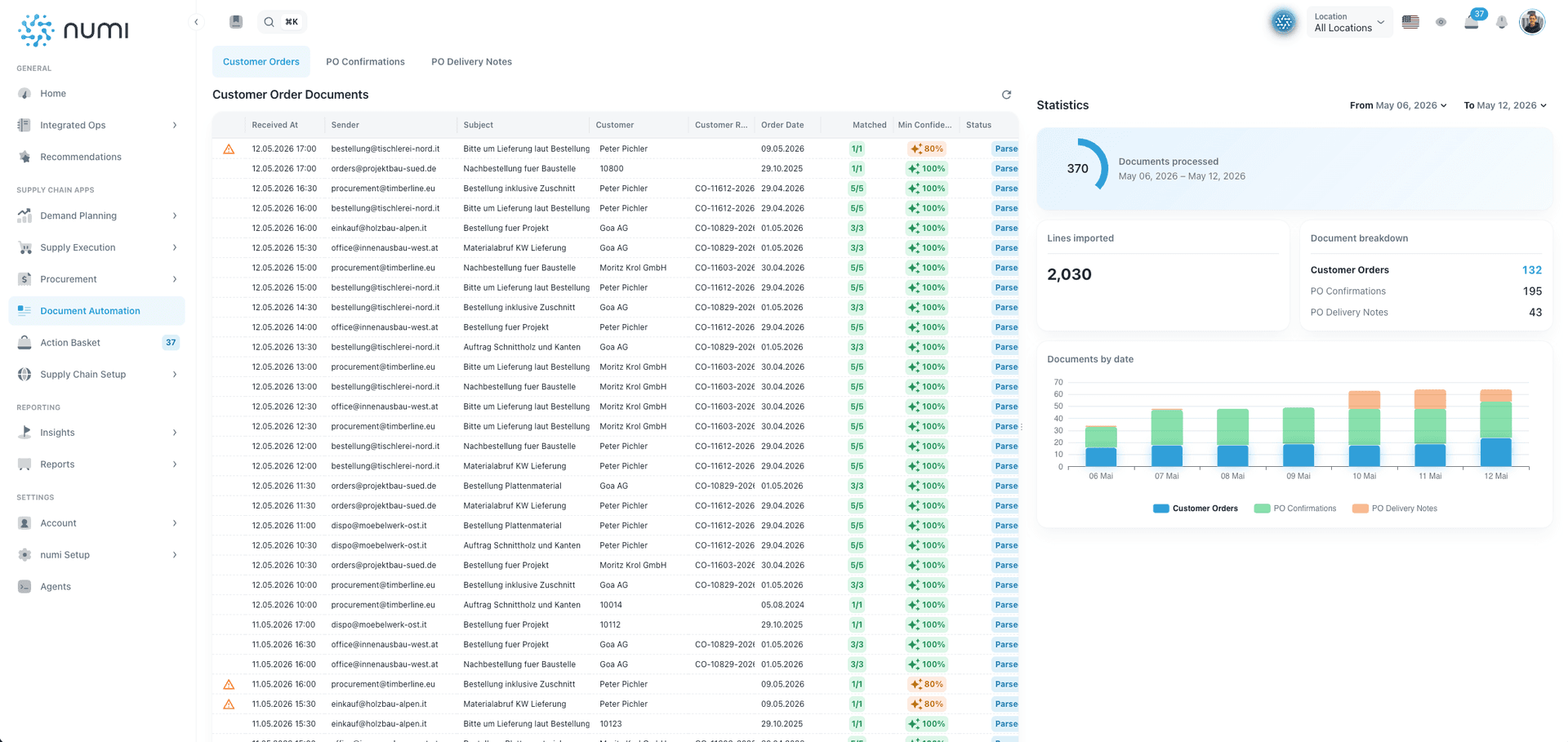
The first major lever is automatic intake of incoming documents. Instead of manually checking inboxes, a system can continuously monitor relevant emails and attachments.
This saves time in several ways. Teams spend less time searching for documents, downloading files and sorting incoming cases. Customer orders, purchase order confirmations and delivery notes can be detected automatically and routed to the right process.
This becomes especially valuable when document volume is high. If many suppliers or customers send documents every day, manual processing quickly creates a backlog. Documents remain in inboxes, are processed late or need to be searched for several times.
With automatic intake, incoming documents become centrally visible. Teams can see faster which documents arrived, what their status is and which cases require attention.
Time savings through extraction of line items and references
After intake, the most time consuming part of many document processes begins: reading the content. Item numbers, quantities, delivery dates, prices, purchase order numbers and customer references must be recognized correctly and converted into structured data.
Manually, this step is especially error prone. Small typing mistakes can affect downstream processes. A wrong date, a missed line item or an incorrect reference can create follow up questions, delivery issues or incorrect ERP data.
Document automation reduces this effort significantly. The software reads relevant information from emails, PDFs and Excel files and presents it in a structured format. Employees no longer need to type every line manually. They only review results where uncertainty or deviation exists.
This changes the nature of the work. Manual data entry becomes targeted exception handling.
Time savings through ERP matching
Extraction alone is not enough for many companies. The decisive question is whether the recognized information matches existing ERP data.
Examples:
- Does the purchase order confirmation belong to the right purchase order?
- Do quantities and prices match the open line items?
- Has the delivery date changed?
- Is the customer reference known?
- Are there missing or additional line items?
- Should the case be processed automatically or reviewed manually?
Without automation, employees answer these questions manually. They search the ERP system for open purchase orders, compare line items and mark deviations. This takes time and requires strong concentration.
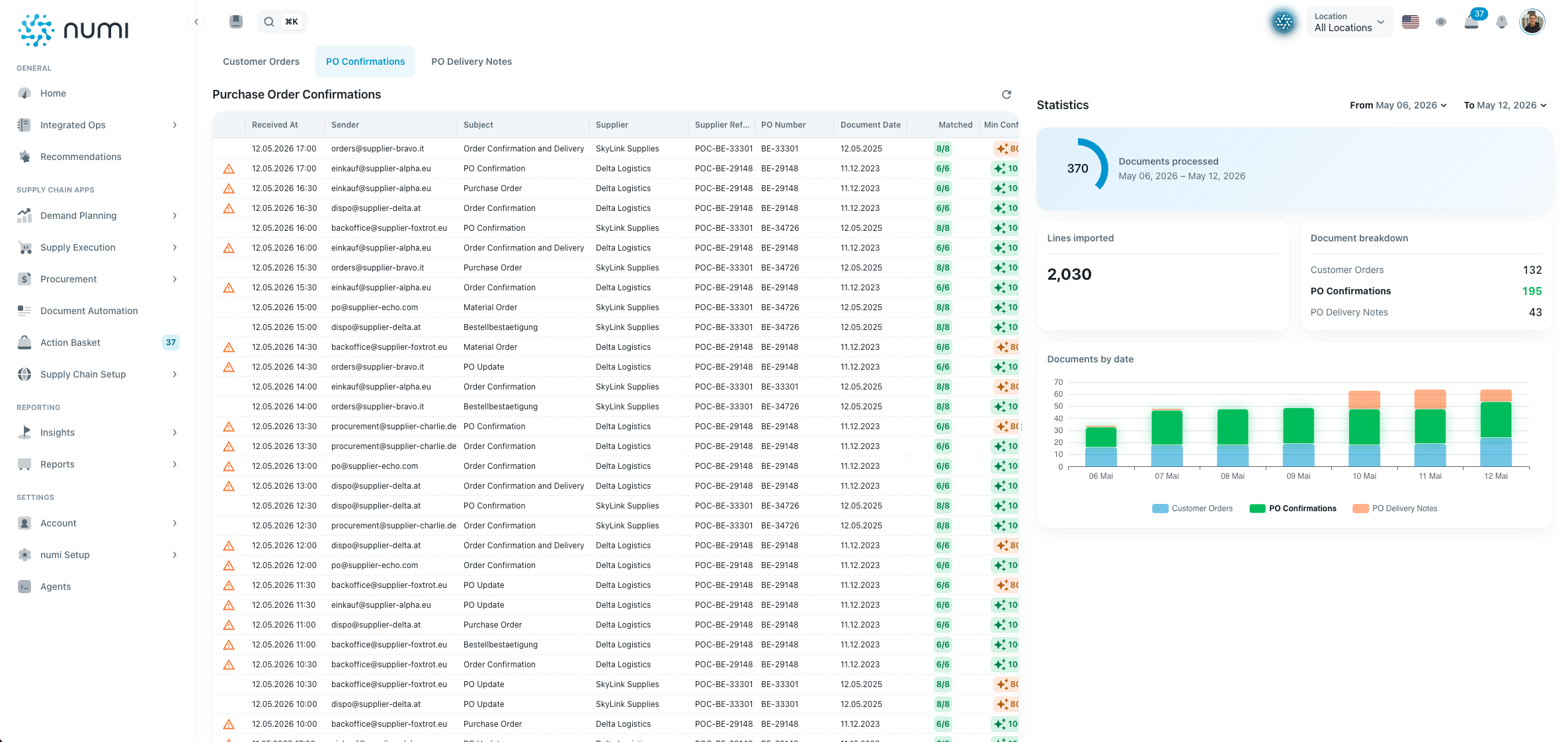
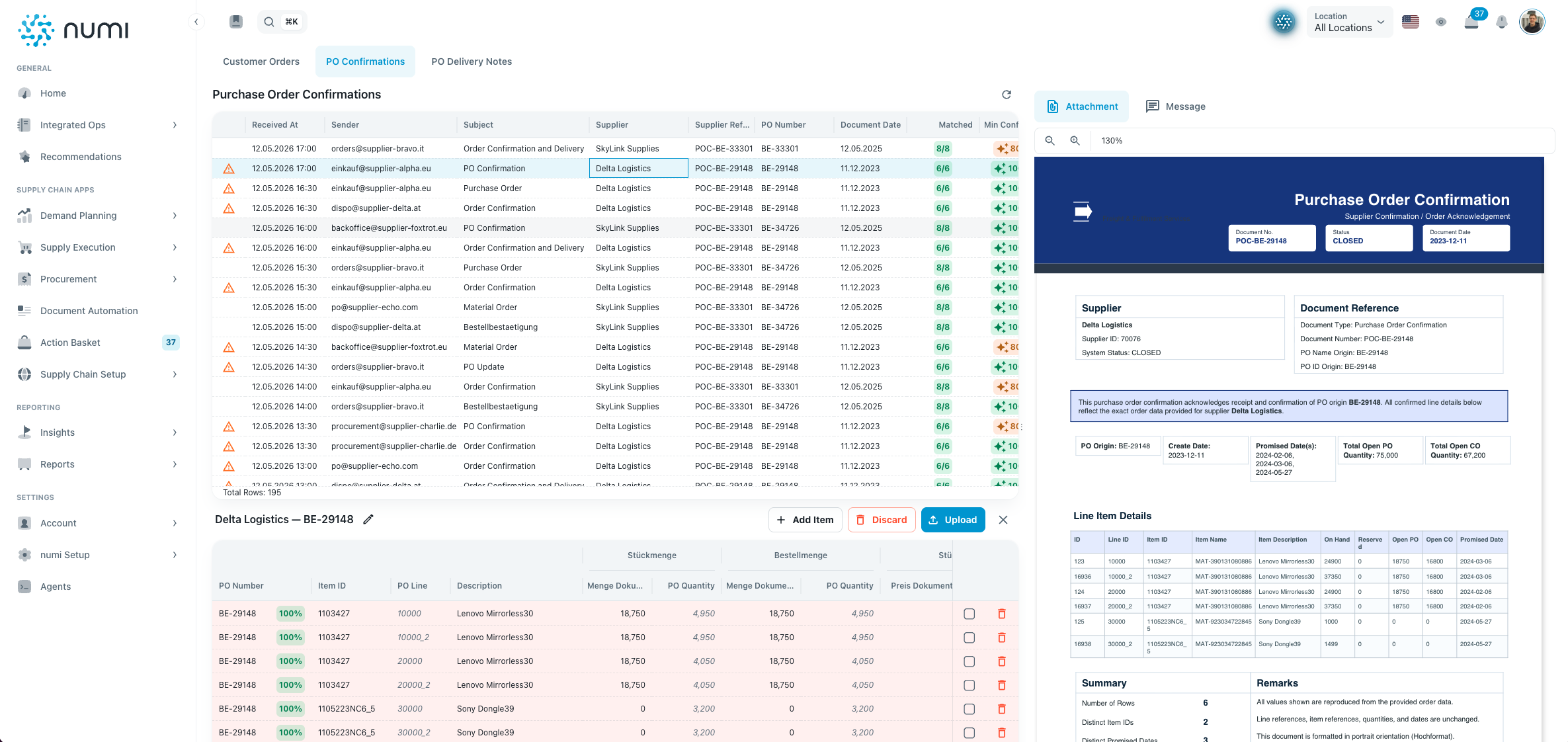
Automated ERP matching can accelerate this review significantly. Document content is connected with customers, suppliers, master data, open orders and purchase orders. Deviations are highlighted. Reliable matches can be prepared directly for downstream processes.
This creates meaningful relief. Employees no longer need to search for every line item manually. They can immediately see where action is required.
Time savings through automated exception handling
Not every document should be processed automatically. In practice, there are unclear references, low confidence values, missing data or deviations in quantities, prices and dates.
Good document automation does not aim to remove every human review. Instead, it ensures that people only intervene where it is truly necessary.
This saves a large amount of time. Instead of treating all documents the same way, cases are prioritized. High confidence and clear matches can continue automatically. Low confidence or relevant deviations are shown for review.
For teams, this means:
- Less routine checking
- Faster processing of reliable documents
- Clearer focus on critical cases
- Better traceability of decisions
- Fewer follow up questions between teams
In supply chain processes, this prioritization is particularly important. A delayed delivery or a changed quantity must become visible quickly. Document automation helps detect these deviations earlier and respond faster.
Typical use cases with high savings potential
Customer orders
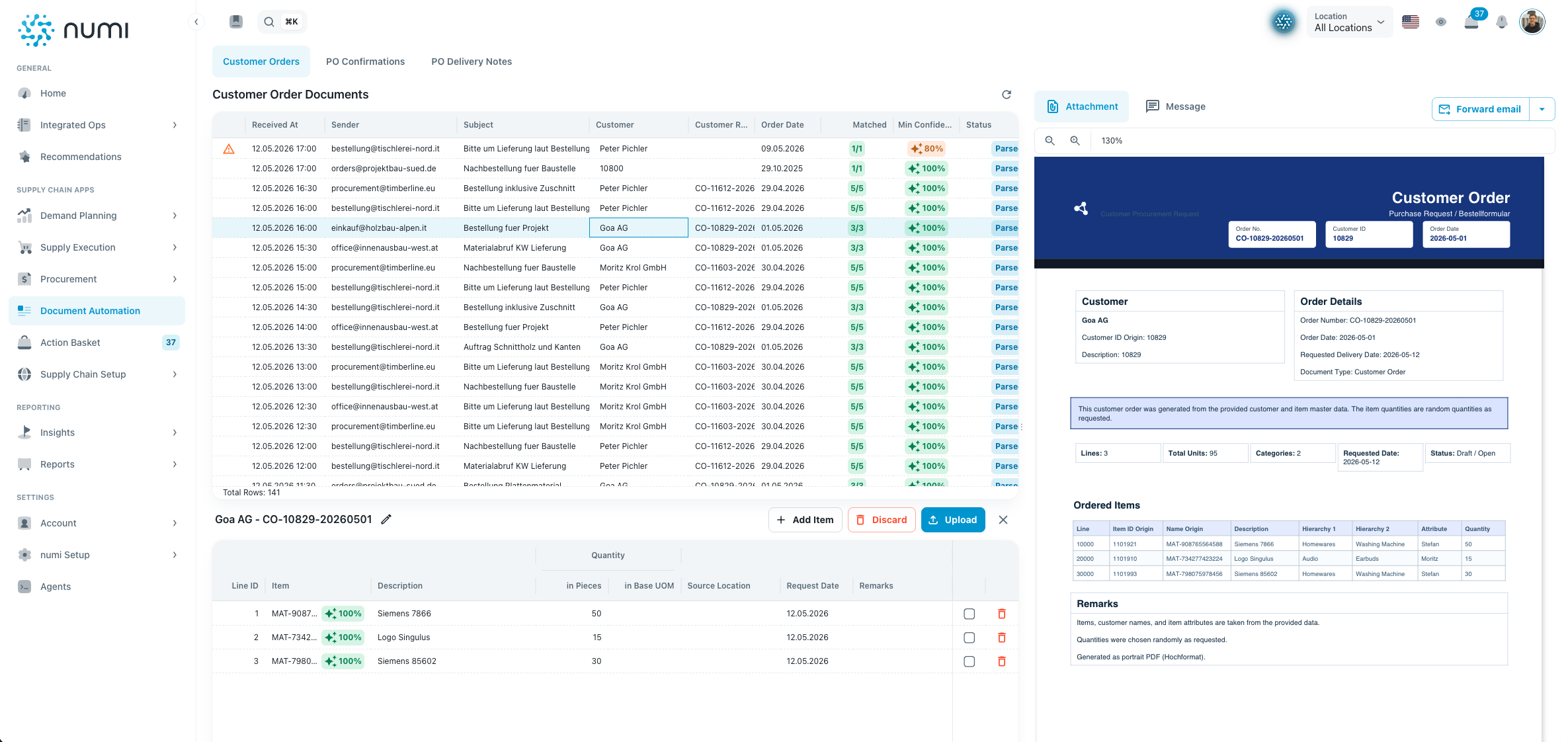
Incoming customer orders are often sent as PDFs, email text or Excel files. Without automation, employees manually transfer line items and check customer references.
With document automation, orders can be read automatically, structured and matched with master data. This helps prepare orders faster and start ERP processes earlier.
Purchase order confirmations
Purchase order confirmations often contain important information about quantities, prices and delivery dates. At the same time, they are time consuming because every line item must be compared with the original purchase order.
Automation helps check confirmations faster, highlight deviations and prepare purchase order updates. Procurement teams spend less time comparing rows and more time managing suppliers.
Delivery notes
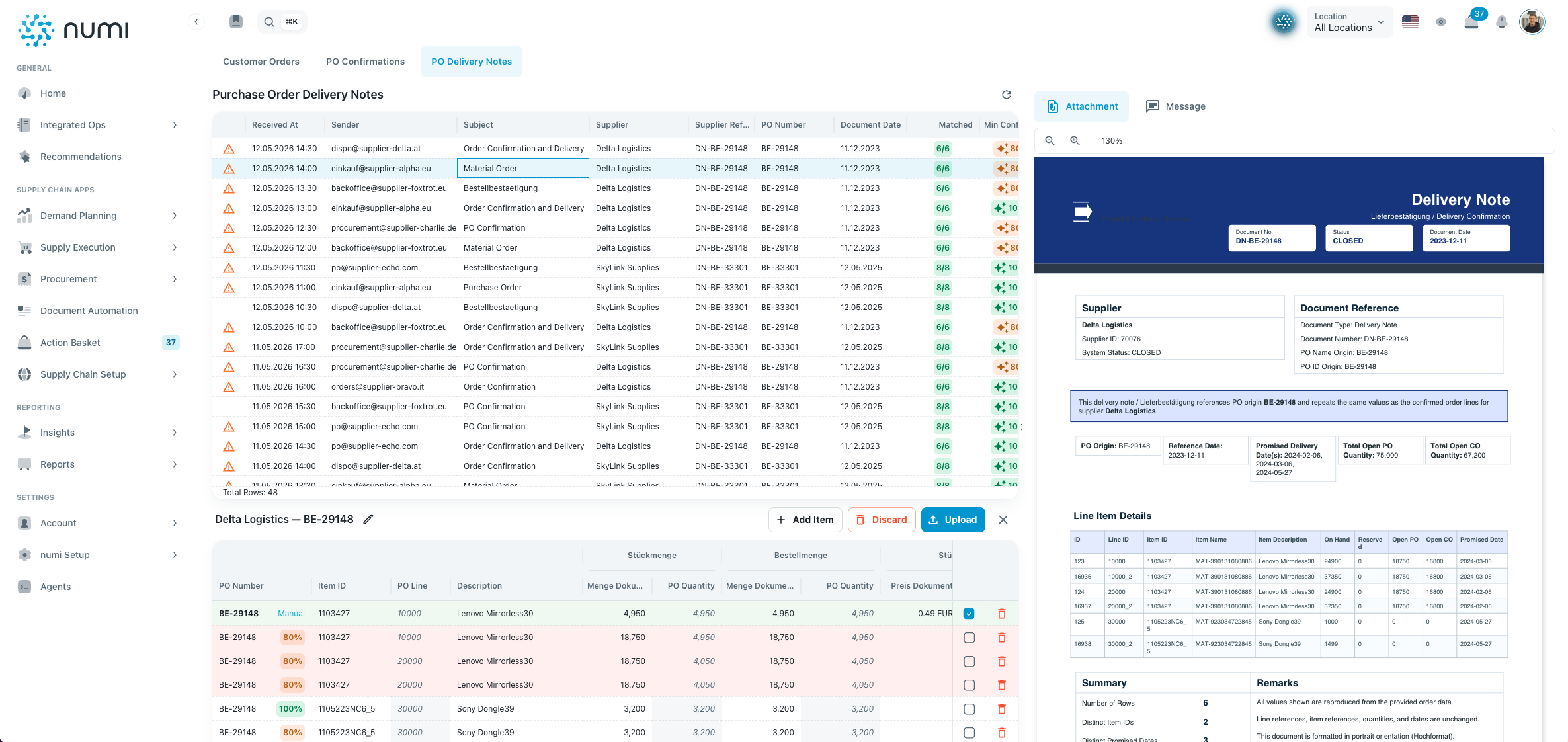
Delivery notes are important for goods receipt, delivery status and downstream processes. If they are processed late or manually, information gaps arise.
Automated processing can detect delivery notes, extract relevant data and match them with purchase orders or deliveries. This helps operational teams understand delivery status and deviations faster.
Strategic benefits of document automation
Direct time savings are often the first measurable effect. Over time, companies gain additional benefits that are just as important.
- Higher data quality: Automatic extraction and validation reduce manual input errors.
- Faster response times: Documents are detected, reviewed and processed earlier.
- Better transparency: Status, confidence and decisions remain traceable.
- Scalable processes: Higher document volume does not automatically require more manual work.
- Relieved teams: Employees can focus on exceptions and decisions.
- Stronger ERP processes: Documents are directly connected to operational workflows.
Scalability is especially important. Many companies see document volume grow faster than team size. Without automation, this leads to overload, backlogs and increasing process cost. With automation, the same team can handle more cases without sacrificing quality or transparency.
How companies can measure the impact
The value of document automation can be measured with clear metrics. Before implementation, companies should understand how much time is currently spent on individual document processes.
Important metrics include:
- Number of processed documents per week
- Average processing time per document
- Share of automatically classified documents
- Share of automatically extracted line items
- Share of automatically matched ERP objects
- Number of detected deviations
- Time until ERP update
- Share of manual reviews
- Error rate in manual data entry
These metrics help make the impact of automation visible. In many cases, repetitive document processes show high savings potential very quickly.
A simple example illustrates the scale. If a team processes 300 purchase order confirmations per week and each manual check takes four minutes on average, the team spends 20 hours per week on this process. If automation reduces this effort by 70 percent, the team saves 14 hours per week. Over a year, this equals several hundred hours that can be used for supplier management, exception handling and process improvement.
Success factors for implementation
For document automation to succeed long term, companies should not look only at the technology. The automation must be embedded into existing processes and systems.
Important success factors include:
Select the right processes
Processes with high volume, recurring document types and clear rules are especially suitable. Customer orders, purchase order confirmations and delivery notes are often strong starting points.
Integrate ERP data
The largest benefit appears when document content is matched directly with ERP data. This is what turns extraction into an operational workflow.
Define exceptions clearly
Not every case should be processed automatically. Companies should define when confidence values are sufficient and when manual review is required.
Create transparency
Teams need to understand which information was extracted, which match was made and why a case requires review.
Scale step by step
A practical approach is to start with one document type and expand automation to additional processes over time.
Why document automation is more than OCR
Many companies initially associate document automation with OCR. OCR can recognize text in documents, but it does not solve the operational problem on its own. The real value emerges when information is understood, matched and transferred into processes.
For ERP and supply chain, the decisive questions are:
- Which purchase order belongs to this document?
- Which line item was confirmed?
- Which quantity changed?
- Which delivery date matters?
- Which deviation requires review?
- Which ERP process should be updated?
A modern Document Intelligence solution answers exactly these questions. It connects documents with operational context and turns unstructured inputs into usable process information.
Conclusion
Document automation is one of the most effective levers for relieving operational teams and saving valuable working time. Especially where many emails, PDFs and Excel attachments are processed, manual effort quickly becomes significant.
Through automatic intake, intelligent extraction, ERP matching and prioritized exception handling, companies can accelerate document processes substantially. Employees spend less time copying data, comparing line items manually and checking routine cases.
The greatest value appears when document automation is not treated as a standalone tool, but is connected directly to ERP processes. Then documents become structured transactions, manual checking becomes targeted exception handling and administrative work becomes measurable operational efficiency.
Companies that automate document processes early gain time, improve data quality and create scalable workflows for procurement, supply chain and operations.