Email received
DOCUMENT AUTOMATION
Understand documents automatically. Update ERP processes directly.
numi processes customer orders, purchase order confirmations and delivery notes automatically, reconciles content with ERP data and transfers information directly into operational workflows.
Document Intelligence Pipeline
Documents become ERP transactions
Unstructured intake
Attachment detected
Excel
Customer order
Document Intelligence Engine
Line items extracted
Line items detected
ERP matching
Confidence 98%
Operational ERP outcome
Customer order created
PO updated
Delivery note processed
Review exception
Documents become ERP transactions.
BENEFITS
Document automation with measurable impact
numi turns emails, PDFs and Excel attachments into structured ERP workflows — faster, traceable and with less manual effort.
-80%
Less manual effort
Documents are read, matched and prepared for operational workflows automatically.
< 1 min
From document to ERP update
Customer orders, PO confirmations and delivery notes are processed much faster.
100%
Traceable document history
Every extraction, match and decision remains transparently documented.
24/7
Automated processing
Incoming documents are continuously checked, processed and prioritized.
Actual results depend on document quality, ERP integration, process rules and automation level.
Automate Supply Chain Documents
Capture, validate, and create or update purchase order confirmations, delivery notes, supplier invoices or customer orders in your ERP system using AI.
WORKFLOW
From email attachment to ERP transaction
numi connects document intake, AI extraction, ERP matching and operational updates in one continuous automation workflow.
0101 / Workflow
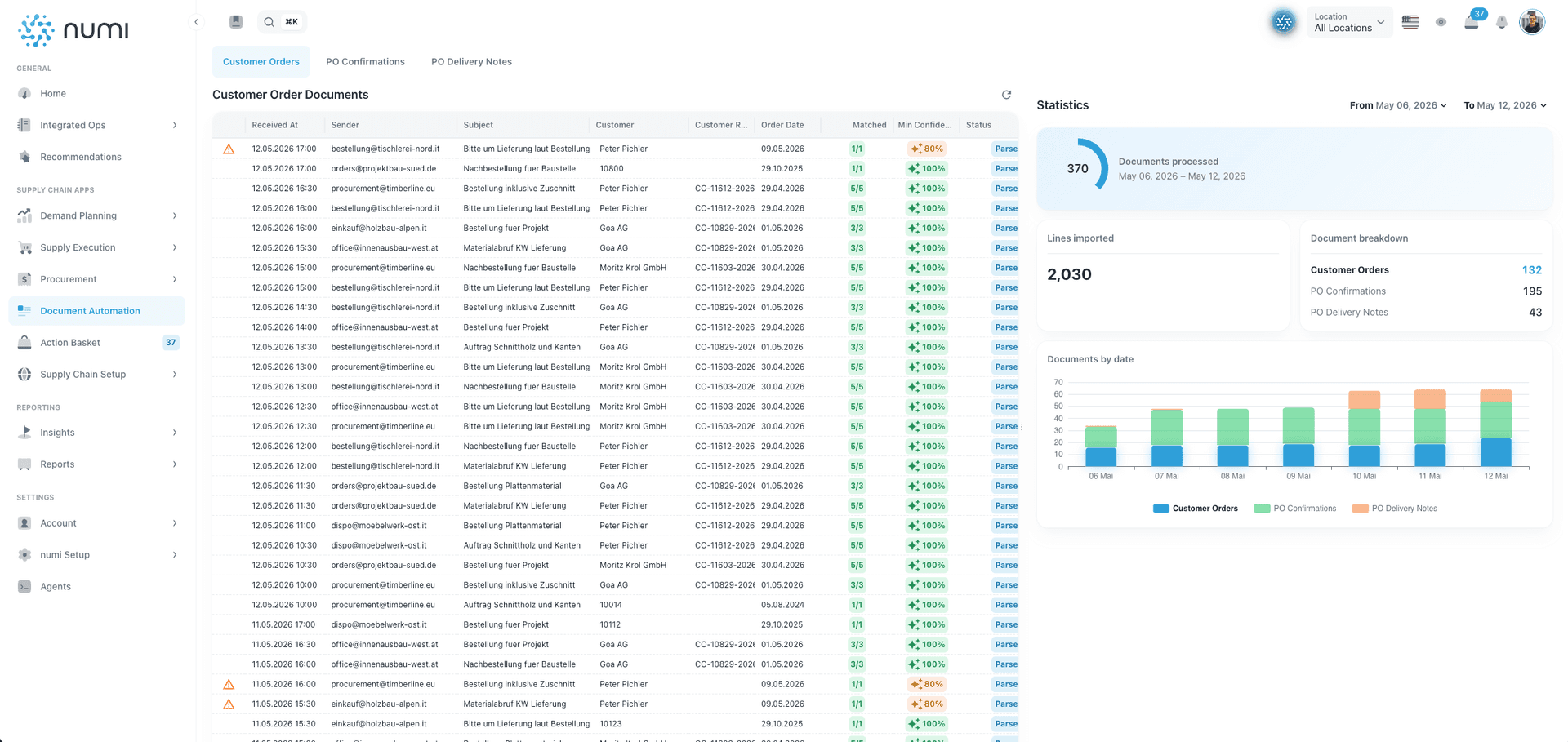
Capture documents automatically
Process emails, PDFs and attachments centrally
Monitor inboxes:
Customers and suppliers send documents to defined mailboxes.
Detect attachments:
PDFs, Excel files and structured email content are classified automatically.
Identify document types:
numi detects customer orders, purchase order confirmations and delivery notes.
Prioritize processing:
Operationally relevant documents are routed into the right workflow automatically.
0202 / Workflow
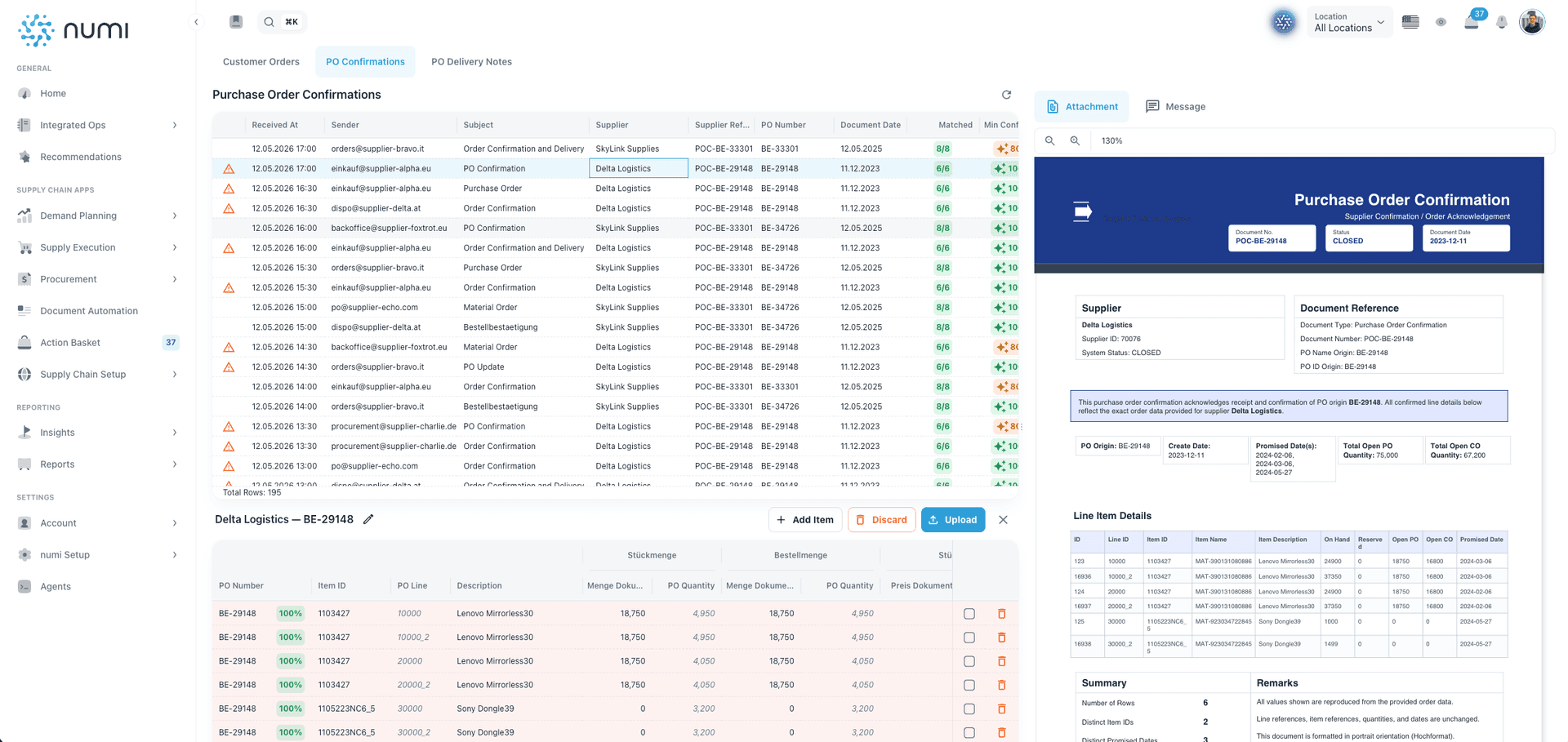
Match line items and references
Connect document content with ERP data
Extract line items:
Items, quantities, dates, prices and references are read from documents.
Match ERP objects:
Customers, suppliers, purchase orders, sales orders and line items are matched automatically.
Check confidence:
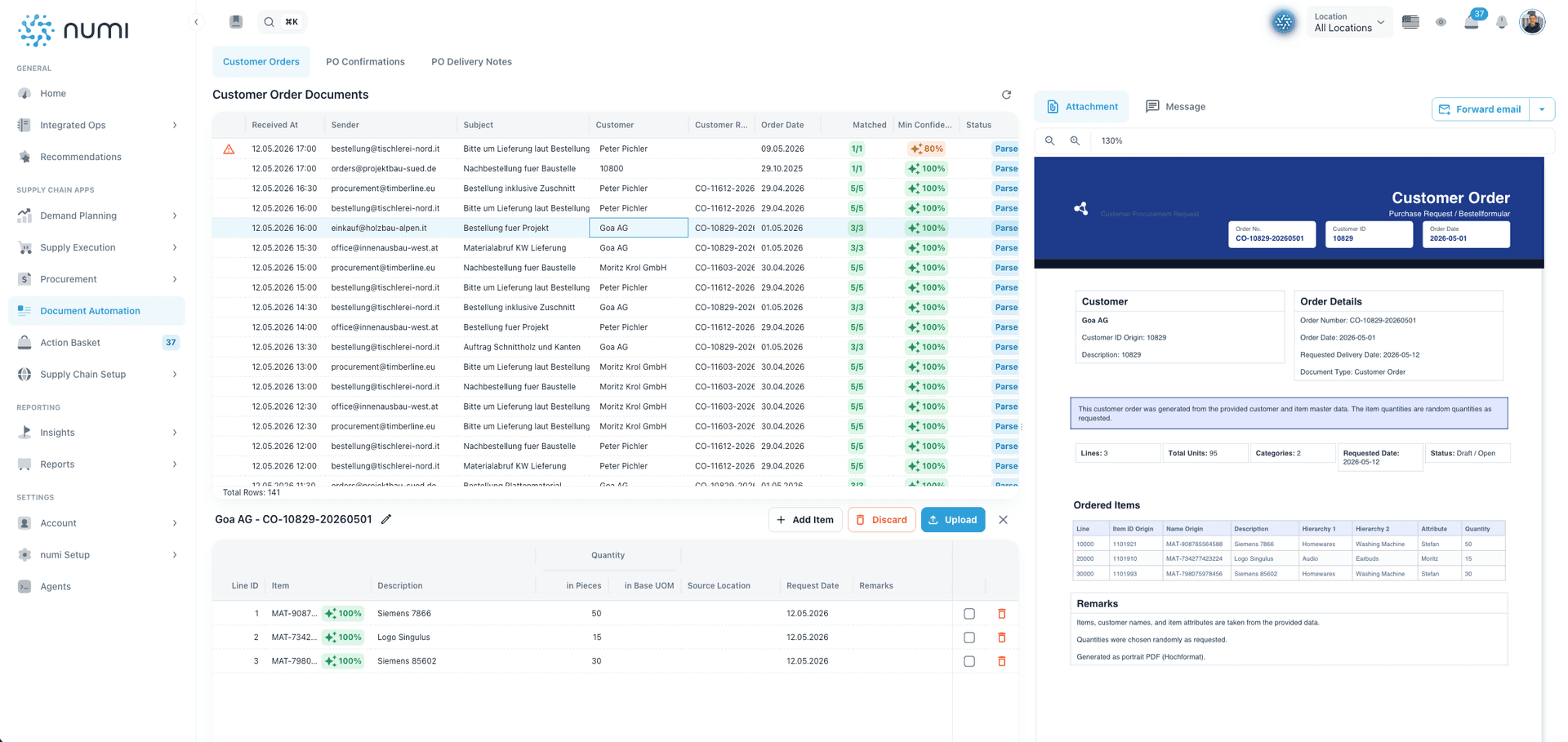
numi shows which values were recognized confidently and which require review.
Detect deviations:
Quantity, date or price deviations are highlighted clearly.
0303 / Workflow
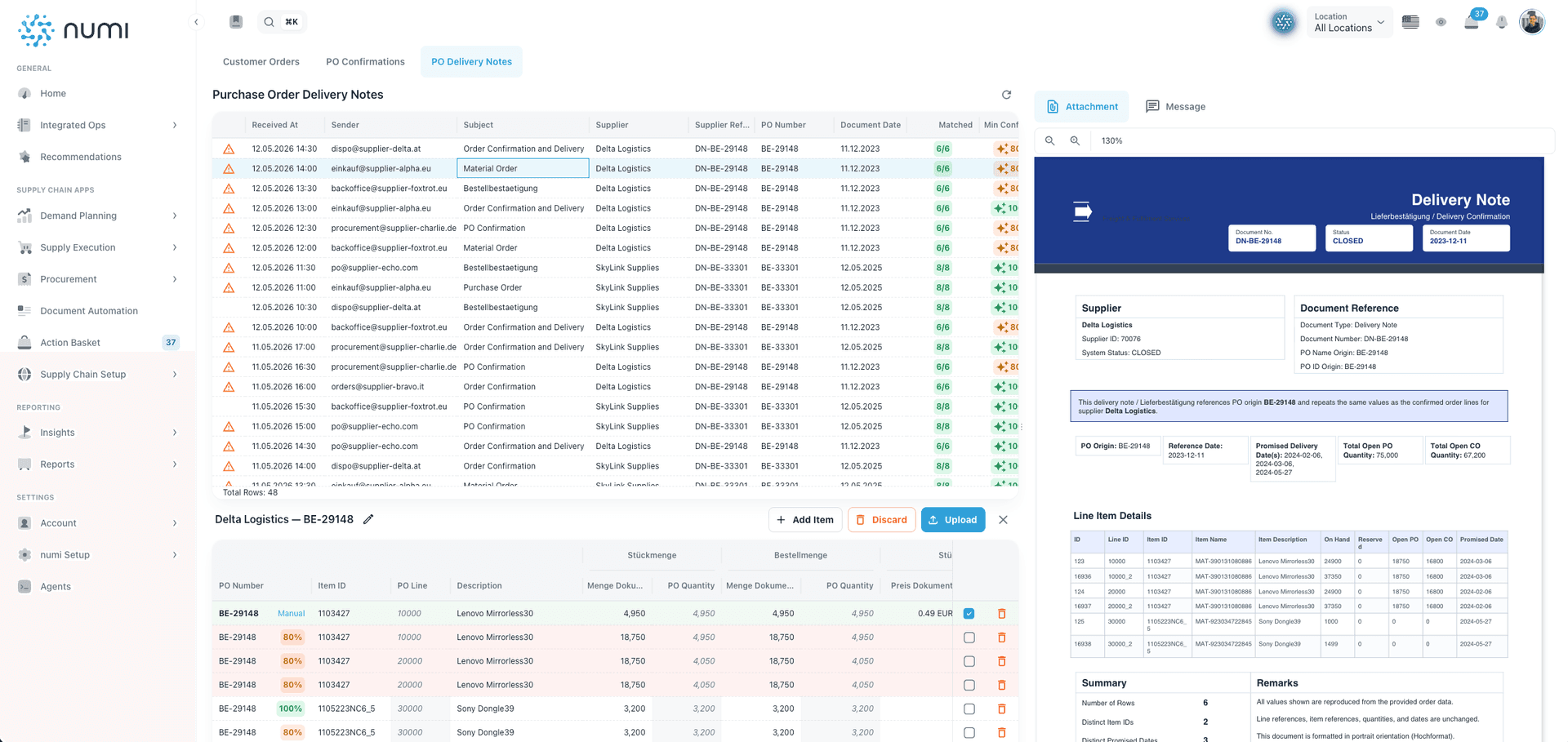
Update ERP workflows
Turn documents into operational transactions
Create customer orders:
Incoming customer orders can be converted into structured ERP orders.
Update purchase orders:
PO confirmations can update dates, quantities and line items in existing POs.
Process delivery notes:
Delivery documents are detected, matched and prepared for downstream processes.
Trigger workflows:
Valid documents can be processed automatically or prepared for approval.
0404 / Workflow
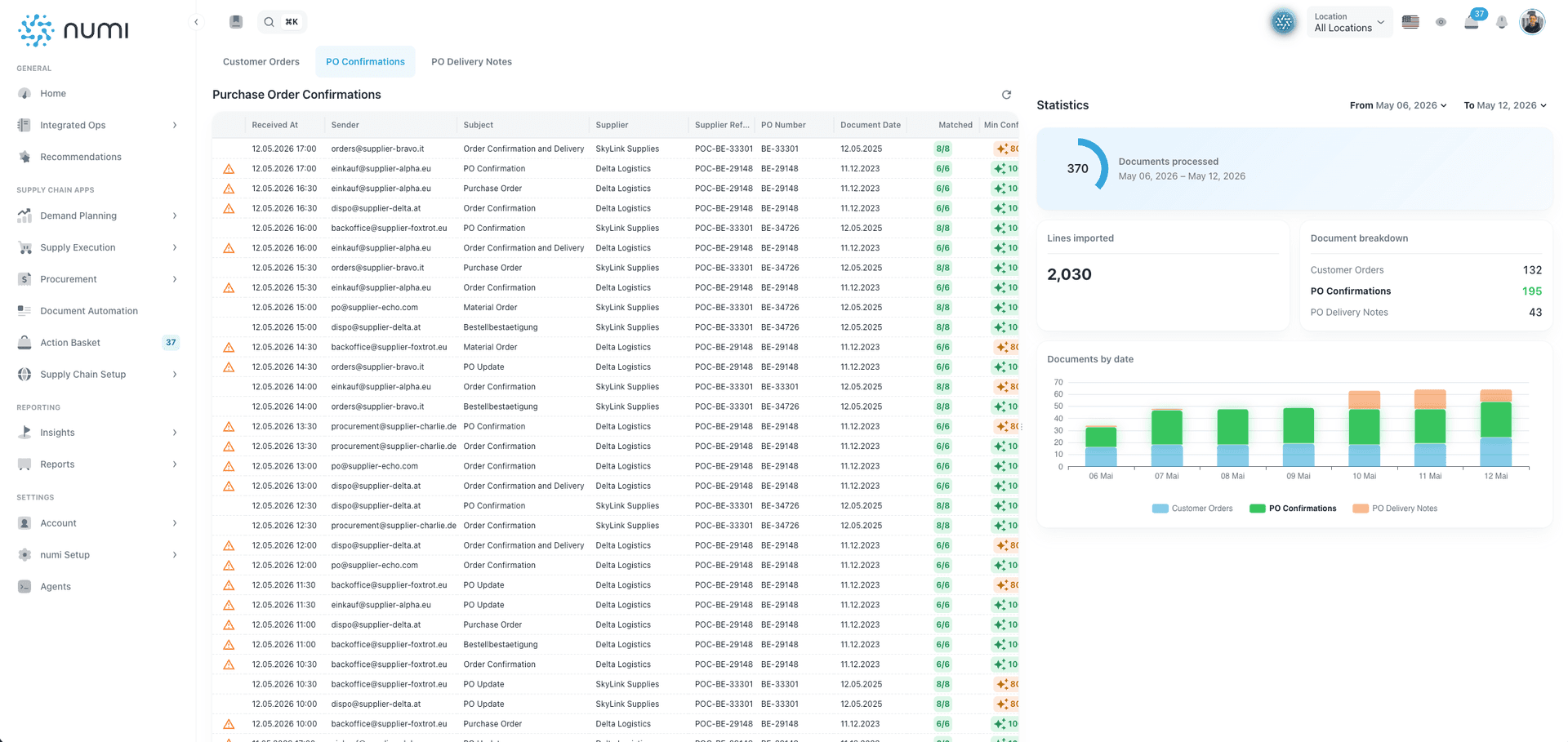
Review exceptions precisely
Automate where confident — review where needed
Flag uncertain documents:
Low confidence, missing references or deviations are prioritized for review.
Support manual review:
Users see document, extraction and ERP match side by side.
Document decisions:
Every correction, approval or rejection remains traceable.
Scale automation:
Recurring high-quality documents can increasingly be processed automatically.
From manual document review to automated ERP workflows
numi replaces scattered inbox checks and manual copy-paste with structured, traceable document automation for operational ERP processes.
Operational document processing
Before numiEmails and attachments are opened manually
With numinumi reads emails and attachments automatically
Before numiPDFs are typed or copied by hand
With numiLine items, quantities and dates are extracted in a structured way
Before numiCustomer orders are created manually in ERP
With numiDocuments are matched with ERP data and open records
Before numiPO confirmations are checked line by line
With numiCustomer orders and PO updates can be prepared directly
Before numiDelivery notes and dates are processed late
With numiDeviations and low confidence are prioritized for review
Before numiDeviations become visible only after follow-up
With numiDecisions and changes remain traceable
Before numiDocument status is scattered across inboxes
With numiDocuments become operational ERP transactions
The numi Document Intelligence Engine turns documents into ERP transactions
numi connects emails, attachments, document content and ERP data to extract relevant information, match it and trigger operational workflows.
Emails
PDFs
Excel files
Email body
Customer references
Supplier references
ERP master data
Open orders
Document Intelligence Engine
ERP transaction prepared
Customer order
PO update
Delivery note
Line item match
Confidence score
Exception review
ERP update
Document history
From email intake and document extraction to ERP matching, exception review and workflow updates.
How document automation saves hours every week
Many operational teams lose time every week to emails, PDFs, Excel attachments and manual ERP data entry. The article explains how document automation reduces this work: documents are captured automatically, line items are extracted, matched with ERP data and prioritized based on confidence and deviations. Customer orders, purchase order confirmations and delivery notes can be processed faster. Teams spend less time copying data, searching documents and comparing rows, and more time on exceptions, supplier management and process improvement.
USE CASES
Typical use cases for document automation
numi supports teams that want to process operational documents faster and connect them directly with ERP workflows.
Retail, Wholesale & BrandsCapture customer orders automatically and start ERP workflows faster.Learn moreManufacturing & machineryProcess PO confirmations, delivery documents and order data in a structured way.Learn moreAftermarket & spare partsAutomate spare-parts orders, delivery documents and service-relevant records.Learn more
FAQ – Document Automation
What is document automation?
Document automation means that incoming documents such as emails, PDFs or Excel attachments are read, structured and transferred into operational workflows automatically. numi connects this processing directly with ERP data and supply chain workflows.
Which documents can numi process?
numi can process customer orders, purchase order confirmations, delivery notes and similar operational documents. It can extract information from email bodies, PDFs, Excel files and attachments.
Can numi create customer orders automatically?
Yes. Incoming customer orders can be read automatically, matched with master data and prepared or created as structured orders for ERP workflows.
Can numi process purchase order confirmations?
Yes. numi detects PO confirmations, matches line items with open purchase orders and highlights date, quantity or price deviations for ERP updates.
Can numi read delivery notes automatically?
Yes. Delivery notes can be detected automatically, matched with purchase orders or deliveries and prepared for downstream processes.
How does numi handle uncertain documents?
numi uses confidence scores and flags documents, line items or values that should be reviewed. Users can compare extraction, original document and ERP match side by side.
Is numi just OCR?
No. numi goes beyond OCR. The software does not only extract text, but matches content with ERP data, detects deviations and prepares operational transactions.
Which ERP systems can be connected?
Depending on the project, numi can connect to different ERP systems. The goal is to integrate extracted and validated document information into existing order, purchasing or delivery workflows.
Ready to automate document processing?
Let us show you how numi turns emails, PDFs and attachments into structured ERP transactions.